
Huckleberry: Baby Tracker
Huckleberry LabsParenting
4.93.77K Reviews
- Version
- 0.9.316
- Installs
- 1.00M
- Age Rating
- Everyone
Screenshots
Our Review of Huckleberry: Baby Tracker
 Analysis by Appyee
When I think about baby-care apps, the biggest question is whether they make a tiring routine easier to understand or simply give parents more to manage. Huckleberry: Smart Baby Care aims to bring sleep guidance and everyday tracking together, and I find that combination most useful when several caregivers are trying to make sense of the same changing routine. Its value is less about replacing a parent’s judgment and more about making the details easier to remember.
Readability and navigation in a sleep-deprived day
On a difficult night, a tool only helps if I can find the right information without stopping to think through a complicated menu. Huckleberry’s straightforward presentation is a sensible fit for quick entries and brief checks. I would still take a moment during a calm part of the day to learn where the main tracking options sit; doing that first can make a middle-of-the-night log feel less like another task.
It is also worth deciding what I actually want to track before recording everything. Sleep and feeding details may answer a current question, while logging every small event can become tiring if the family does not use those notes later. A focused routine makes the daily summary more meaningful: I can look for changes in timing or a pattern that is worth discussing, rather than treating every entry as a verdict on how the day went.
Different bodies, senses, and ways of using a phone
Parenting rarely leaves both hands free, so concise screens and familiar actions matter. I appreciate an interface that does not make a parent hunt through layers while holding a baby, but a phone app still asks for visual attention and touch. That can be awkward for someone with limited dexterity, low vision, or a baby who needs immediate soothing. I would not assume it is equally comfortable for every user simply because the layout feels clean to me.
Sound, brightness, and the need to look at a screen can also matter when a household is trying to stay quiet or settle a baby. A practical workaround is to enter a note when the moment allows, rather than insisting on recording it instantly. If one caregiver finds touch-based logging difficult, another person may be able to handle the entries while they share the observations aloud. The app can support a routine, but it should not dictate how a family has to communicate.
Access across changing routines
Huckleberry is a parenting app from Huckleberry Labs, and it has reached a broad audience: it has over a million installs and a 4.8 average from around 30,000 ratings. It is free to download, rated for Everyone, and its current version is 0.9.281 on operating systems from version 10 onward. The release date was June 30, 2017. Those details help set expectations, but they do not tell me whether the app fits a particular caregiver’s needs; the useful test is whether its tracking and advice reduce friction in that person’s day.
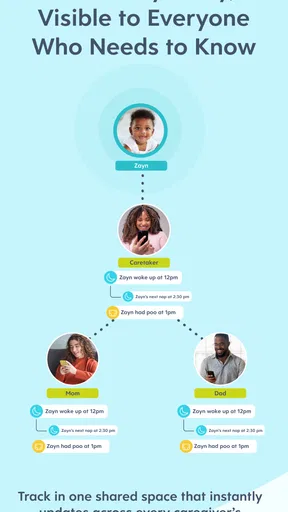
One realistic use is a handover between caregivers. If one person has been noting sleep and feeds, a second can check the shared picture before taking over, instead of relying on a tired memory or a hurried message. I would agree as a family which details matter and use the daily summary as a conversation aid, not as a scorecard. That keeps the record practical and avoids turning ordinary variation into a reason for stress.
For a parent who wants a simple paper notebook, a basic timer, or a single-purpose tracker, the usual alternative may be better. Those options can involve less screen time and fewer decisions. Huckleberry makes more sense when a family wants sleep guidance alongside a broader record of care; its breadth is a benefit only if the family will use it. The app is free to start, while optional in-app purchases range from $11.99 to $119.99 per item, so I would consider whether paid help is relevant before treating it as part of the basic tracking experience.
Getting Started with Huckleberry
First things first, setting up Huckleberry was a breeze. The app guides you through the initial setup with a series of questions about your baby’s age, sleep patterns, and any specific concerns you might have. It’s pretty intuitive, and within minutes, I felt like the app had a personalized plan ready to go.
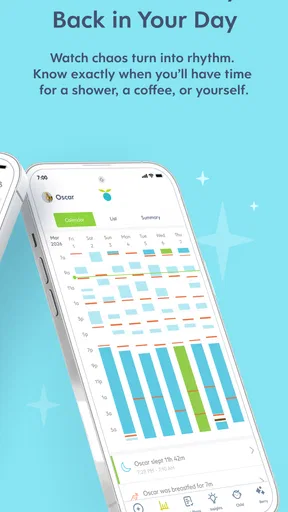
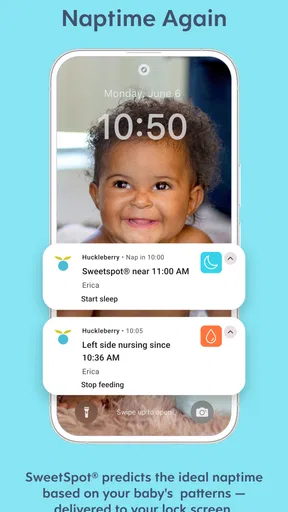
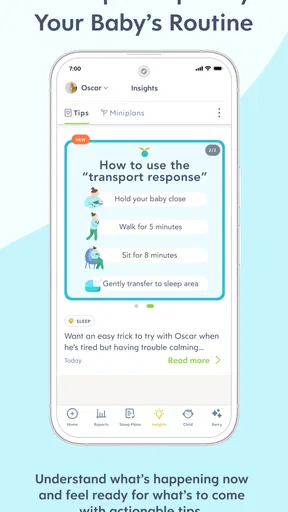
One of the standout features is the sleep analysis tool. You log your baby’s sleep patterns, and the app uses this data to offer tailored advice. I found the sleep predictions to be eerily accurate, which was a game-changer during those endless nights.
Features That Make Life Easier
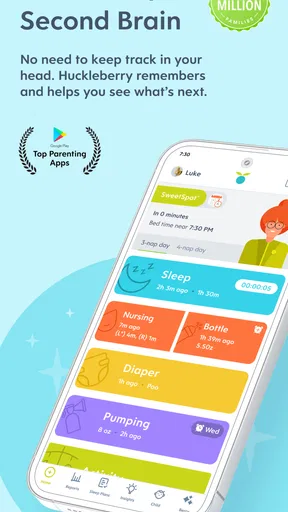
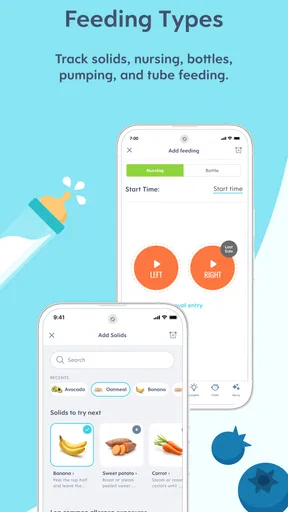
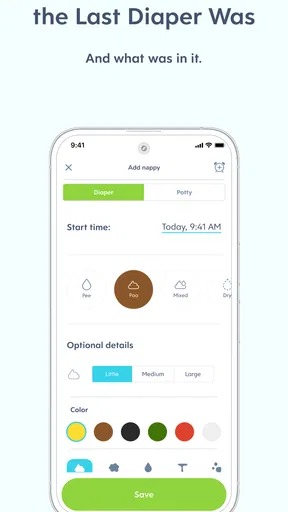
The app isn’t just about sleep; it’s a comprehensive baby care tool. From tracking feedings and diaper changes to growth charts, it covers all the bases. I particularly loved the feeding tracker, as it helped me keep tabs on feeding intervals and amounts, which is crucial during those early days.
Another nifty feature is the daily summary. At the end of each day, you get a quick overview of your baby’s activities, which is a great way to spot any patterns or unusual changes. It’s like a diary but without the extra effort.
A useful way to get more from that record is to keep entries consistent between caregivers. If one person logs a feed immediately and another waits until later, the timeline can become less reliable. I would agree on a simple convention—for example, whether amounts are recorded when a feed starts or finishes—and avoid filling gaps from memory unless the detail is clear. A slightly incomplete but honest log is more helpful than a precise-looking record built from guesses.
I would also treat patterns as prompts for attention, not proof that something is wrong or a substitute for professional advice. A summary can help me describe a routine clearly when asking a question, especially if I have been too tired to remember the sequence of events. The strongest use is practical: notice a change, check whether it persists, and decide what to do with a caregiver or clinician as appropriate.
Using Huckleberry on the Go
What’s great about Huckleberry is its portability. Whether you’re at home or out and about, the app is super easy to use. The interface is clean and straightforward, which means you’re not fumbling around trying to figure things out when you’ve got a crying baby in one hand.
I also appreciated the community aspect. There’s a support network within the app where you can connect with other parents. Sharing experiences and tips can sometimes be just as valuable as the app’s expert advice.
On an outing, I would not let logging become the priority over tending to the baby. If entering details in the moment is inconvenient, I can make a brief note for myself and add it when I am settled. That trade-off is especially useful for caregivers who are driving, managing a stroller, or trying to keep a sleeping baby undisturbed. The record is there to serve the family; a missed timestamp is not a failure.
The community can offer reassurance and the feeling that other parents understand the same rough patches, but I would use it with sensible boundaries. Other families’ experiences are not automatically a match for my baby, and advice shared between parents should not be treated as a diagnosis. If comparing stories makes me more anxious rather than more supported, it is reasonable to step back and rely on a trusted professional for health concerns.
Final Thoughts
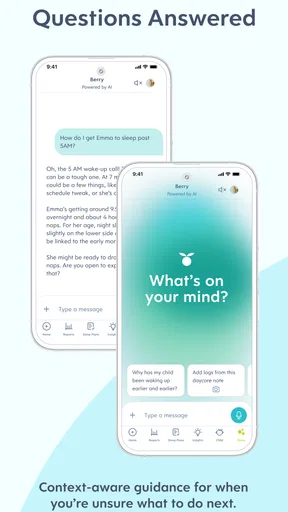
In my opinion, Huckleberry: Smart Baby Care is a must-have for any new parent. It’s like having a personal consultant that’s available 24/7. The combination of expert advice and real-time data makes it an invaluable tool for navigating the ups and downs of parenting.
If you’re looking for an app that’s both comprehensive and user-friendly, give Huckleberry a try. It’s a bit like having a guide who’s been through it all and knows exactly what advice to give at the right time. Trust me, you’ll wonder how you ever managed without it.
My recommendation is strongest for caregivers who want a shared, evolving record and are comfortable checking a phone during the day. I would be more cautious if screen interaction is difficult, if tracking tends to create pressure, or if all a family needs is a simple reminder. In those cases, a notebook or a narrower tool may feel calmer. For everyone else, I would begin with only the entries that answer a real question, see whether the summaries help, and add more only if the routine benefits from it.
Privacy and Permissions
See what permissions an app requests and how it handles your data.
- Photos/Media/Files
- read the contents of your USB storage, modify or delete the contents of your USB storage
- Storage
- read the contents of your USB storage, modify or delete the contents of your USB storage
- Camera
- take pictures and videos
- Microphone
- record audio
- Other
- view network connections, pair with Bluetooth devices, full network access, change your audio settings, run at startup, control vibration, prevent device from sleeping, read Google service configuration
Verdict
Strengths of Huckleberry: Baby Tracker
- User-friendly interface for all parents.
- Detailed sleep tracking and insights.
- Personalized routines and reminders.
- Helpful expert advice and tips.
- Syncs data across multiple devices.
Limitations of Huckleberry: Baby Tracker
- Limited features in free version.
- Requires internet for full functionality.
- Some reports are not customizable.
- Notifications can be frequent.
- Not all features are intuitive.
Similar Picks in This Category
View All
Family Space
Motorola Mobility LLC.3.9

شرطة الأطفال - مكالمة وهمية
Oub Apps4.1

Findmykids: Parental Control
LETEM LTD4.6

Pregnancy + | Tracker App
Philips Electronics UK Limited4.8

Policía de niños - para padres
Kids police4.7

Pregnancy App
Amila4.9
Frequently Asked Questions
What is Huckleberry: Smart Baby Care and how does it work?
Huckleberry: Smart Baby Care is an app designed to assist parents with tracking and optimizing their baby's sleep patterns, feeding schedules, and overall development. It combines data about your baby's habits with expert advice to provide personalized recommendations. The app uses a unique algorithm to predict optimal nap times, ensuring your baby gets the rest they need.
Is Huckleberry: Smart Baby Care suitable for all ages of children?
Huckleberry is primarily designed for infants and toddlers, focusing on sleep and feeding patterns typical of younger children. However, parents of older children may also find some features useful, such as the sleep tracking and expert tips. It’s best suited for children from birth up to about five years old.
How much does it cost to use Huckleberry: Smart Baby Care?
Huckleberry offers a free version with basic features, including sleep tracking and general tips. If you want access to more advanced features, like personalized sleep plans and expert consultations, there is a premium subscription option. Prices can vary, so it's advisable to check the app store for current rates.
Is the data entered into Huckleberry: Smart Baby Care secure?
Yes, Huckleberry prioritizes user privacy and data security. The app uses encryption to protect your data and complies with privacy regulations. You can rest assured that your personal information, as well as data related to your child, is handled with care and is not shared without your consent.
Can Huckleberry: Smart Baby Care be used on multiple devices?
Absolutely. Huckleberry allows for synchronization across multiple devices, which is perfect for families where both parents or caregivers want to stay updated on the baby’s routines. This feature ensures that everyone has access to the same information and can contribute to logging data seamlessly.
